06 / UNDER THE HOOD
Let Cloudflare Do the Login
In our first MCP server post, I wrote that auth took longer than everything else combined. The next day we dropped Auth0 and let Cloudflare do the login.
What customers get
A SolarSENS customer adds one URL to Claude or ChatGPT: mcp.solarsens.co/mcp. They type their email, get a one-time code, and they’re in. No password to forget, no new app to install. They stay in the chat app they already use.
Then they ask questions the way they’d ask a person. How did my plant do yesterday? Which inverter is underperforming this week? Any alarms raised? The MCP server answers from the same data our dashboard and reports use, and only for the plants that customer can see.
The answer isn’t just a paragraph. The model can pull the plant data, the alarm history and the string performance, then put them side by side. In the example below, it found two strings underperforming, checked the alarms, and pointed out that neither string ever raised one. That’s the kind of thing an operator would otherwise find by clicking through three dashboard pages.
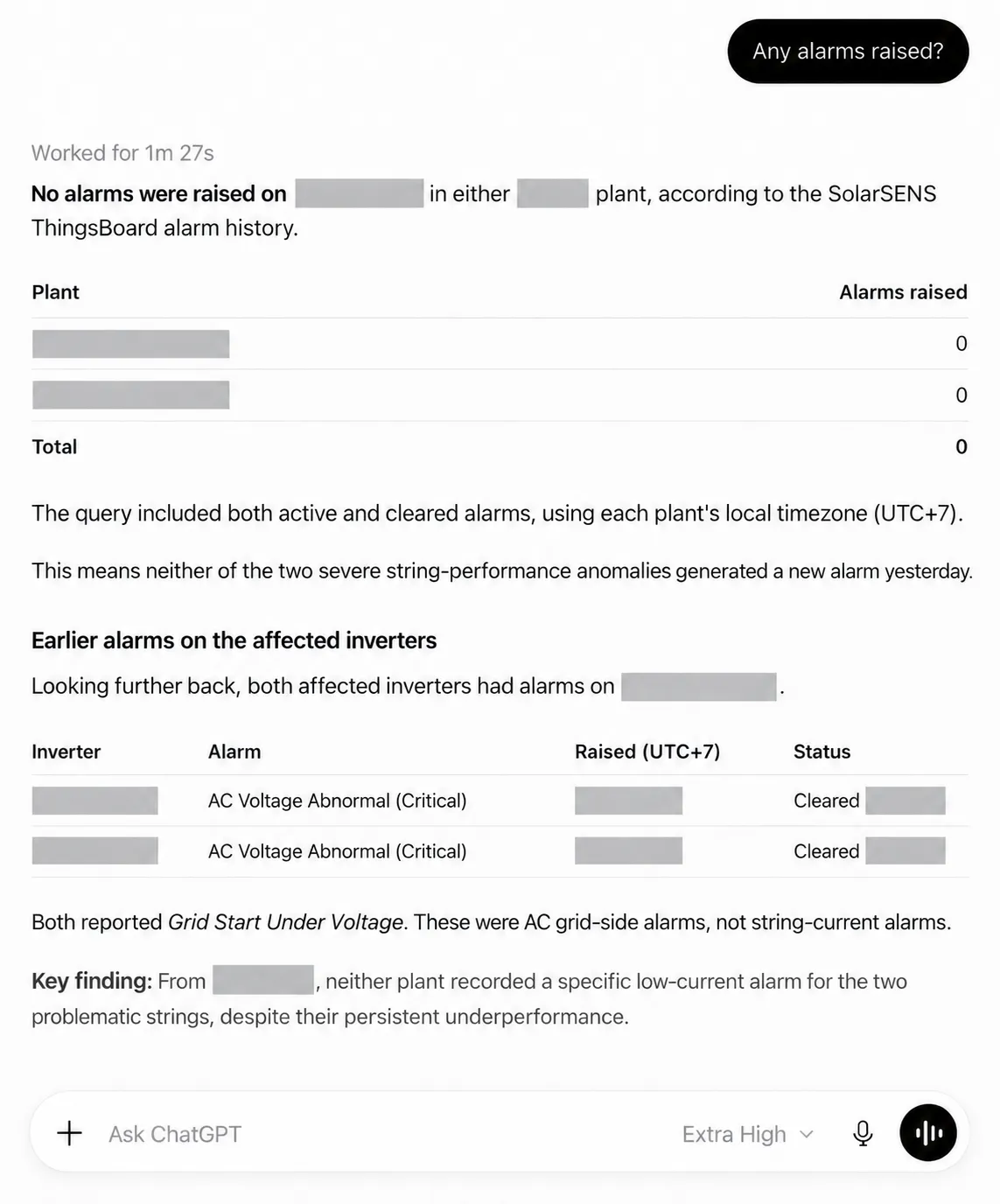
ChatGPT answering “Any alarms raised?” through the SolarSENS MCP server. Plant and inverter names hidden.
Two recent MCP changes made this much nicer to build.
Stateless. The 2026-07-28 spec dropped the session handshake. Every request carries its own token and stands on its own, which is exactly how a Cloudflare Worker wants to run. It also means a portal can sit in front of the server without anyone keeping session state in sync.
UI. With MCP Apps, a tool can come with its own HTML. Our get_plant_chart tool ships a chart template, and the chat app renders it with the tool’s data. Ask Claude for the plant chart and you get our chart, with zoom and a note about missing readings, not the model’s description of one.
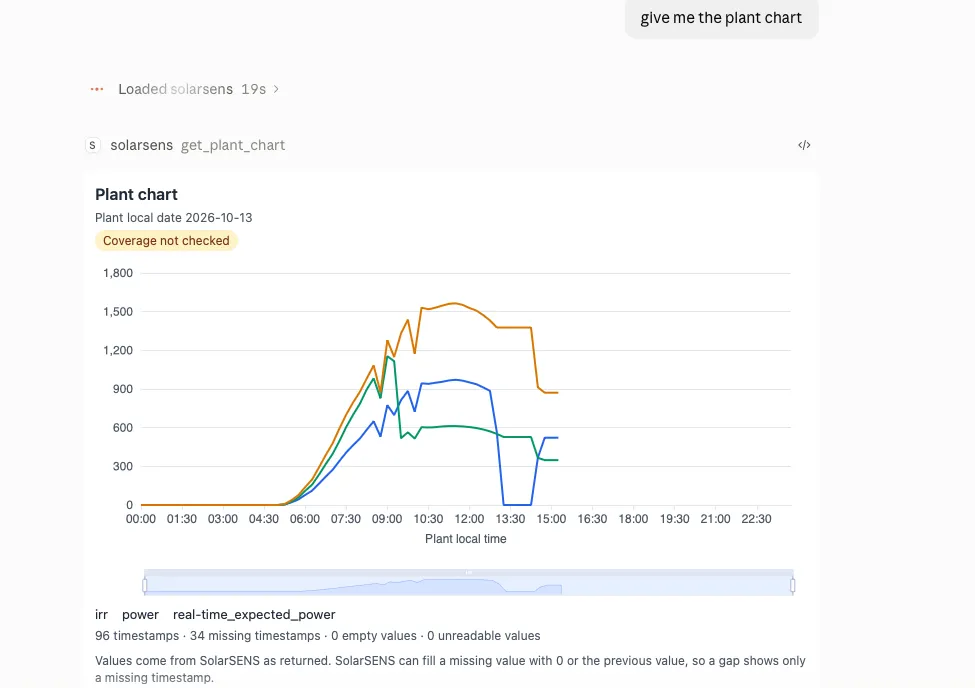
“give me the plant chart” in Claude. The chart is SolarSENS’s own, drawn inside the chat.
What staff get
Staff use the same URL. The difference is the policy. Cloudflare’s MCP server portal shows each person only the servers they’re allowed to use, so internal tools can sit next to the customer ones without customers ever seeing them.
One front door, different rooms behind it.
What we didn’t build
With Auth0, every ChatGPT connection registered itself as a new application, and we ran into the application limit. That was the moment I asked whether Cloudflare Access could do it instead.
It could. Now:
- Adding a customer is adding their email to a policy.
- Removing someone is removing their email.
- Login is Cloudflare’s email PIN. We didn’t write a login page.
- Logs of who called which tool come from Access. We didn’t build those either.
Our code still decides which plants a user sees. Access says who you are. SolarSENS says what’s yours.
At our size it’s free: Zero Trust’s free plan covers up to 50 users.
The catch: ChatGPT app review
Email codes are great for customers. They’re a problem for OpenAI’s app review.
OpenAI wants a demo account its reviewers can sign into with a username and password. No sign-up, no email code. A one-time PIN to an inbox they don’t own doesn’t count.
So Auth0 came back, in a small way. We added it to Access as a second login method, with one reviewer account and policies that let only that account use it. Customers still use the email code.
Two things to watch:
- Access apps accept every login method by default. Add a new identity provider and every app that hasn’t picked its methods will accept it. Restrict the reviewer method on every gate: the portal, the MCP server, and the server behind it.
- The old submission remembers the old login. Our existing ChatGPT app kept sending reviewers to the Auth0-era authorize URL, which now returns a 404. A fresh test app picked up the Cloudflare login fine. The original still needs OpenAI to refresh it.
No browser
Setting Access up is a lot of dashboard clicking, which is fine for a person and slow for an agent. The first time, my agent drove a browser through the Cloudflare dashboard. The session died halfway through an edit.
Then Cloudflare shipped the cf CLI, which covers the whole Cloudflare API. The next time I needed Access in front of an internal dashboard, I just asked the agent, and it did it with commands:
cf cli search "list zero trust access applications"
cf zero-trust access applications update <app-id> --body "$BODY" --dry-run
It searches for the command it needs, checks the change with --dry-run, then applies it. Everything comes back as JSON, so it can read the result instead of squinting at a screenshot. Same for tunnels and DNS since.
Even the domain. Customers connect to mcp.solarsens.co/mcp, not some long generated URL. I didn’t touch DNS for that. I said what address I wanted, and the agent added the record and pointed the portal at it. Provisioning a hostname, in one sentence. Sweet.
The lesson
Don’t build auth if someone will run it for you. And when you pick who runs it, check that your agent can set it up from a terminal.